The short version
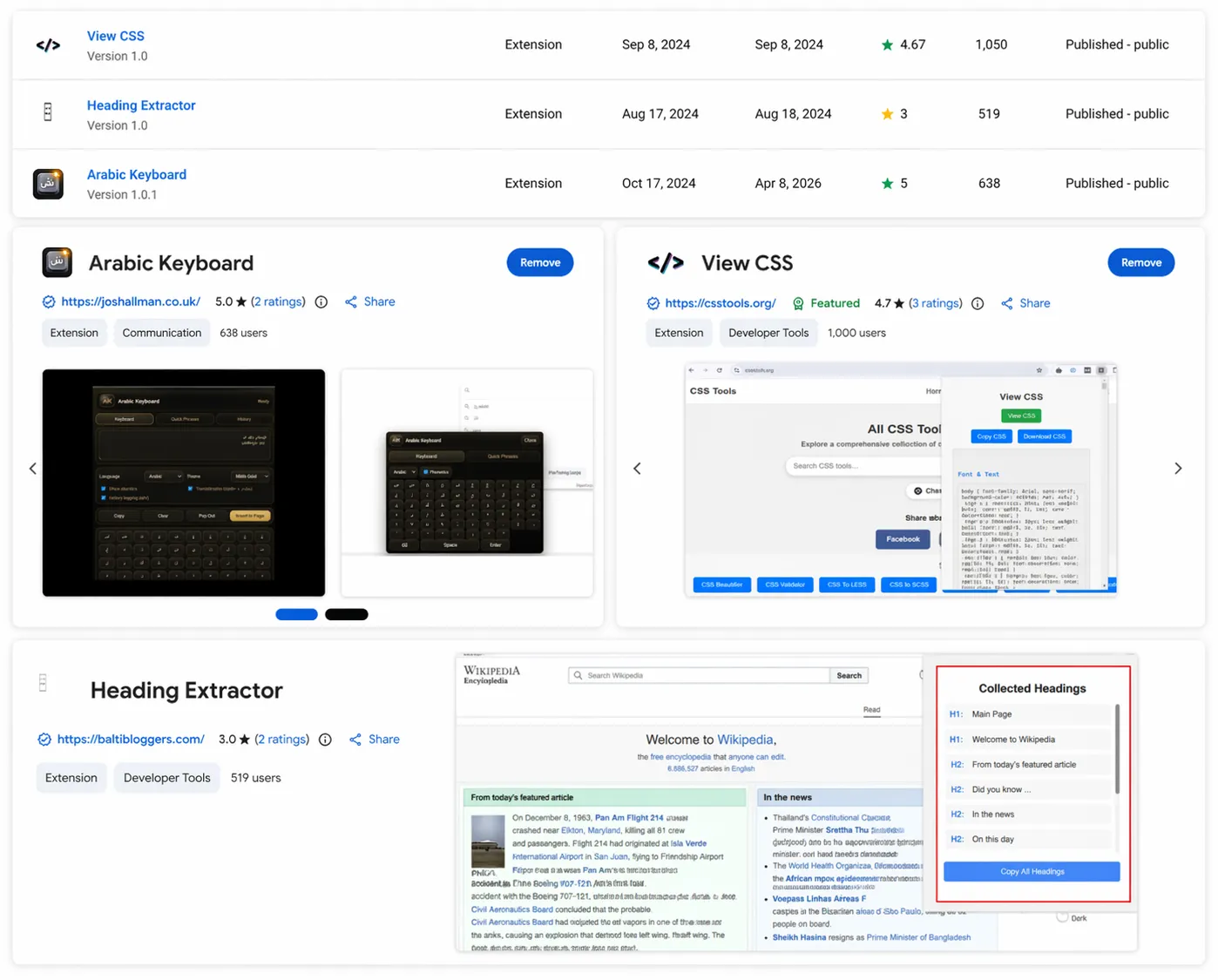
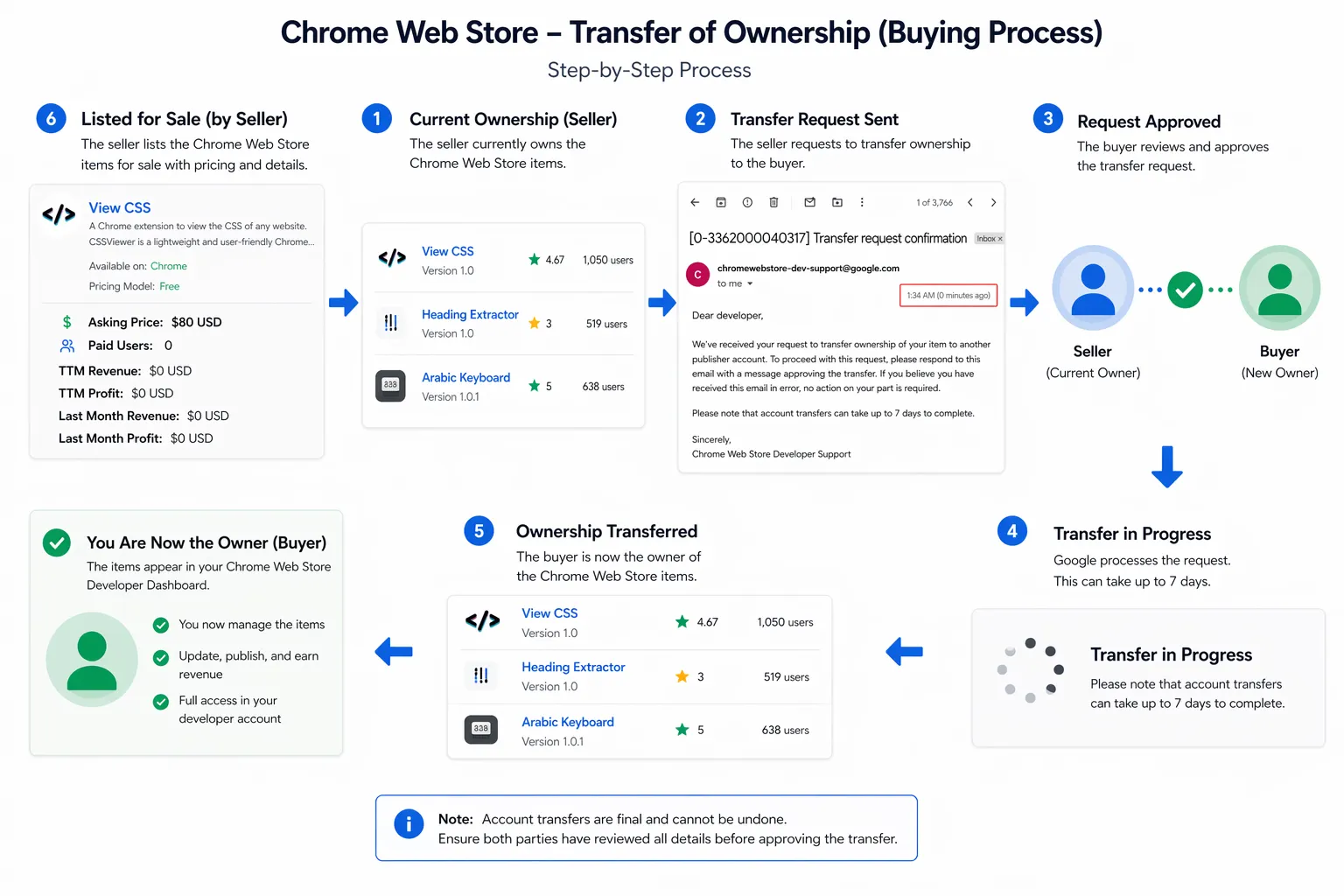
I bought 16 Chrome extensions as part of this research to understand how extension sales work in practice, what buyers actually care about, and what a malicious owner could inherit by taking over something people already trusted.
What stood out was not just the permissions. It was how normal the whole process felt.
If you can buy an extension with an existing user base, you are not just buying code. You are buying distribution, trust, and a path to ship updates to people who already installed you.
That is why extension ownership changes matter more than most people think.
Why I looked at this
I was partly inspired by John Tuckner’s blog posts from Secure Annex, especially his work looking at extension ownership changes and the risks that come with them.
At the same time, I was also waiting for one of my own Chrome extensions to pass review, which had me thinking more about the review process, the trust users place in store-published extensions, and how much of that trust survives once ownership changes hands.
Most people treat “installed from the Chrome Web Store” as a trust signal.
That is a reasonable default, right up until you remember that extensions are also assets. They get sold, transferred, abandoned, revived, and handed over to new owners with very little visibility for the people actually using them.
I wanted to understand what that looked like in practice, not just in theory.
What stood out
A few things became obvious very quickly:
- Install count is part of the sale value
- Existing users are part of the product
- Ownership transfer can feel completely routine
- Trust often survives the transfer, even when the owner changes
A few things also stood out from the process itself:
- The acquisition path did not feel especially exotic
- Some of the extensions were niche, but the trust model was the same
- The risk was rarely the name of the extension, it was the access it had already normalized
- A normal-looking update path is doing a lot of hidden security work for the attacker
That is the real problem. Users tend to trust an extension because of what it was, not because they know who controls it now.
Why permissions matter
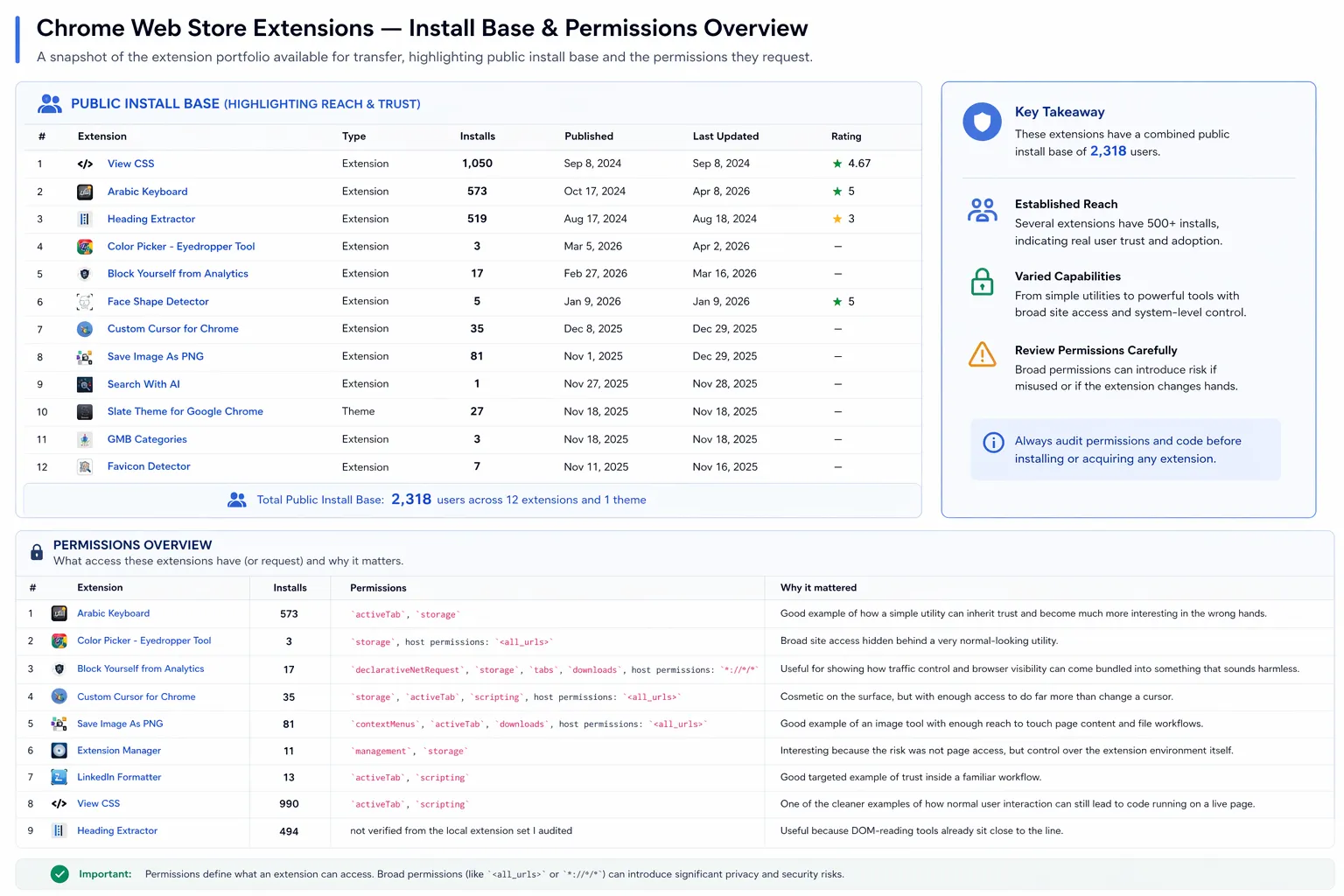
Permissions are where this stops being an abstract trust problem and becomes a practical one.
| Permission (Chrome) | What it enables (in plain terms) |
|---|---|
Host permissions (<all_urls> or specific sites) | Read and modify page content on matching sites; scrape forms; inject UI; alter what users see |
tabs | See open tabs, titles, and URLs; correlate activity across sites |
cookies | Read or modify cookies for permitted sites; can support session hijacking depending on scope |
storage | Persist data and configuration locally; useful for state, targeting rules, and feature flags |
scripting (MV3) | Inject scripts into pages with the right host permissions |
declarativeNetRequest | Modify or block requests; can support redirects or traffic manipulation |
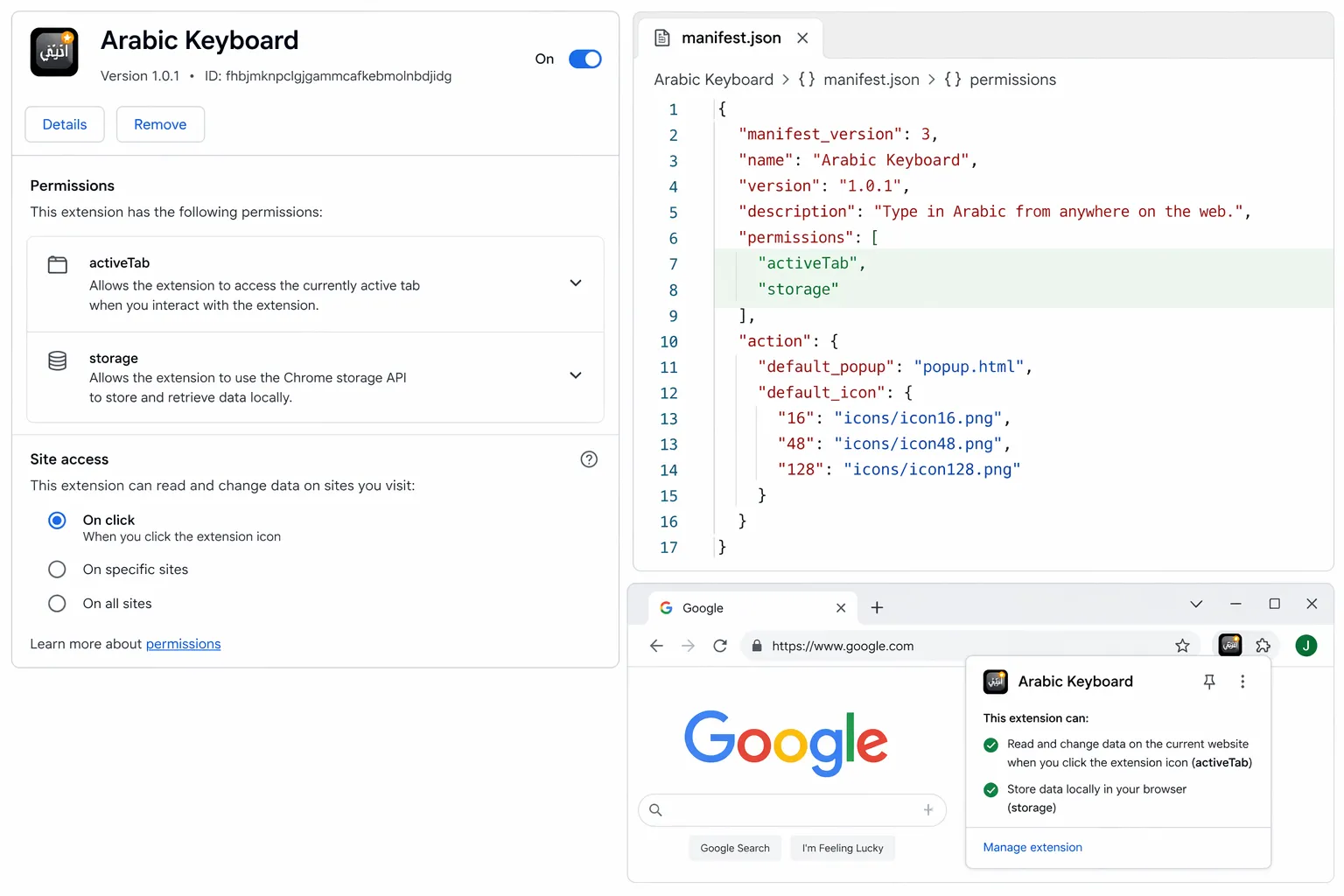
activeTab | Temporary access to the current tab after a user gesture |
clipboardRead / clipboardWrite | Read or replace clipboard content |
downloads | Observe or influence downloads depending on context |
identity | Hook into Google identity flows |
management | View and manage installed extensions/apps; can be abused for profiling, identifying security tools, and interfering with the user’s extension environment |
alarms | Schedule background tasks; useful for persistence, delayed execution, or periodic beaconing |
webNavigation | Observe navigation events and track how users move across pages and sites |
webRequest | Observe and sometimes modify network traffic; powerful for surveillance, redirection, and traffic inspection depending on granted access and Chrome support |
contextMenus | Add right-click menu entries; can be abused for social engineering or to make malicious actions look like normal extension features |
notifications | Display browser notifications; can be abused for phishing prompts, fake alerts, or coercing user interaction |
offscreen | Run background/offscreen documents for tasks not visible to the user; can help hide processing or support stealthier workflows |
nativeMessaging | Communicate with a native application on the host; high risk because it bridges browser and endpoint |
What I bought
| Extension | Installs | Permissions | Why it mattered |
|---|---|---|---|
| Arabic Keyboard | 573 | activeTab, storage | Simple utility inheriting trust to become a high-value target. |
| Color Picker | 4 | storage, <all_urls> | Broad site access hidden behind a common utility. |
| Block Analytics | 12 | declarativeNetRequest, storage, tabs, downloads, *://*/* | Shows how traffic control can be bundled into a “privacy” tool. |
| Custom Cursor | 30 | storage, activeTab, scripting, <all_urls> | Cosmetic tool with enough access to do far more than change a cursor. |
| Save Image As PNG | 79 | contextMenus, activeTab, downloads, <all_urls> | Image tool with reach to touch page content and file workflows. |
| Extension Manager | 11 | management, storage | Risk is not page access, but control over the entire extension environment. |
| LinkedIn Formatter | 13 | activeTab, scripting | Targeted example of trust inside a specific professional workflow. |
| View CSS | 990 | activeTab, scripting | How normal user interaction leads to code running on a live page. |
What a malicious owner could have done
The examples below are framed as impact demonstrations. No malicious updates were pushed to the store.
1. Arabic Keyboard: broad page access
What I inherited
A virtual keyboard built to help users type Arabic across websites, with broad page access.
What a malicious owner could have done
- Injected JavaScript into pages across a wide range of sites.
- Scraped visible form data or login fields on high-value pages.
- Modified page content to add phishing prompts or fake re-auth flows.
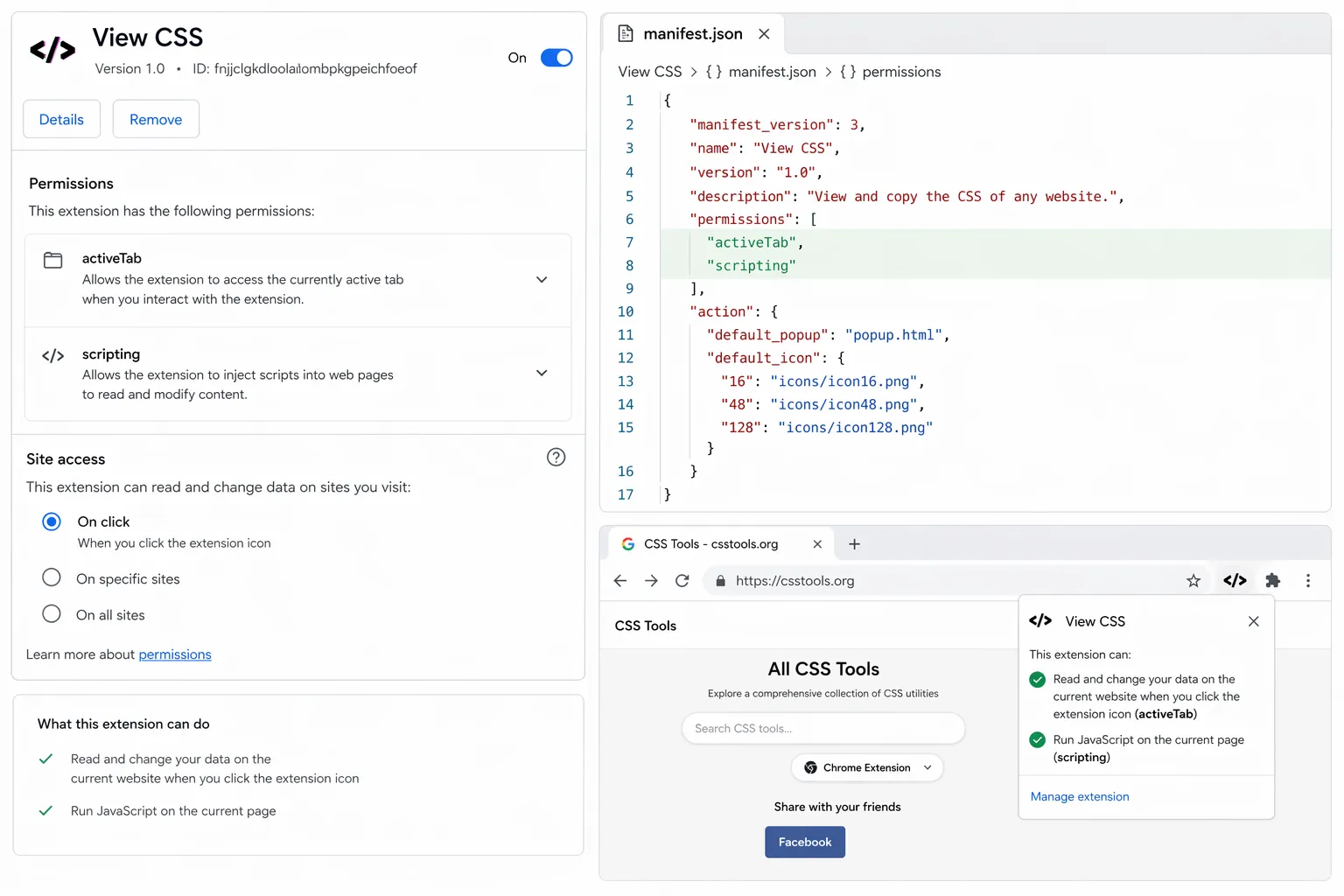
2. View CSS: user-triggered code injection
What I inherited
A CSS inspection extension with activeTab and scripting, designed to interact with the current page.
What a malicious owner could have done
- Injected JavaScript into the active page after a normal click.
- Read or modify visible page content on sensitive sites.
- Added fake prompts or altered trusted UI inside the current tab.
3. Extension Manager: control over the environment
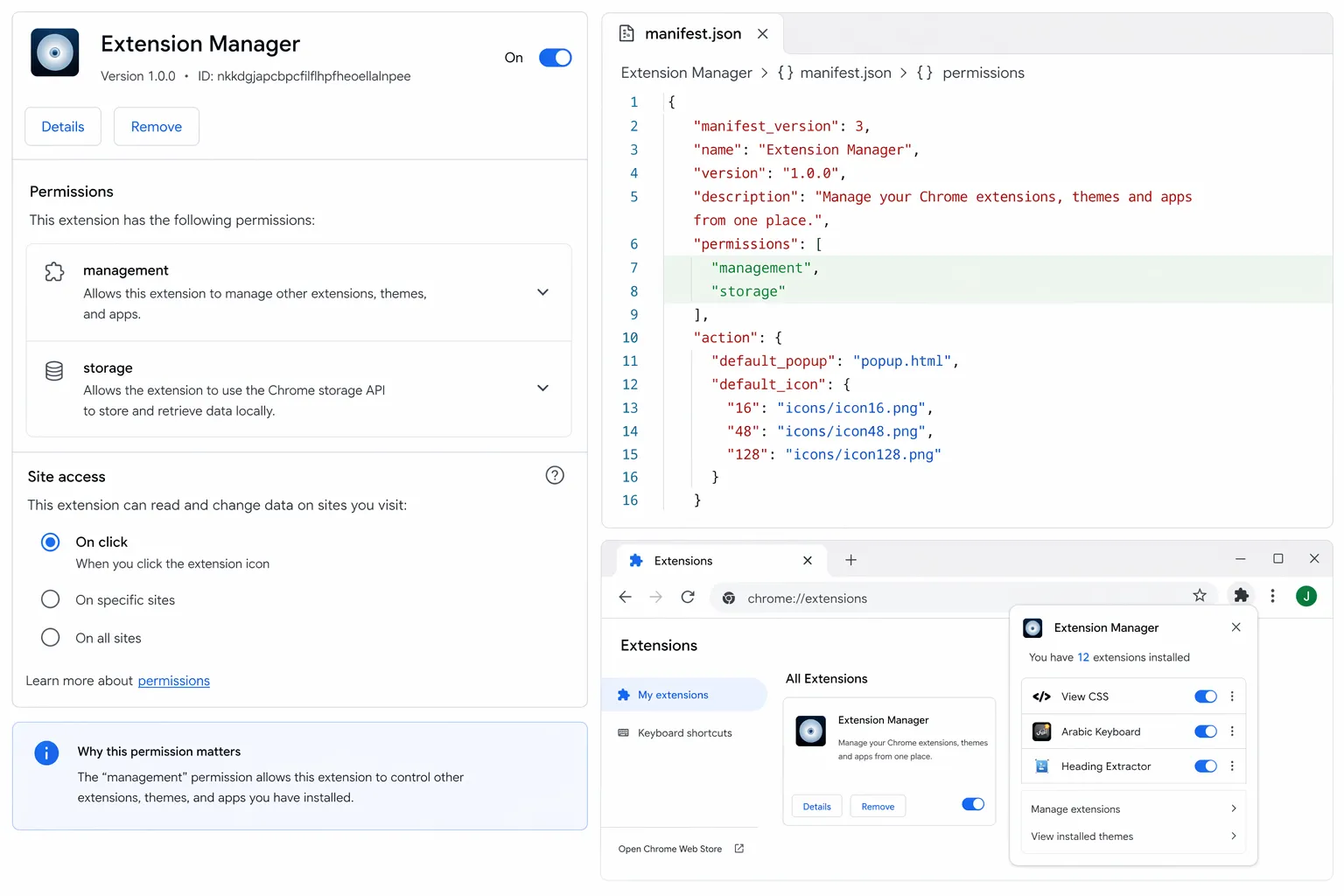
What I inherited
An extension management tool with management and storage.
What a malicious owner could have done
- Enumerated the user’s installed extensions.
- Identified security or crypto-related tools for profiling.
- Interfered with protective extensions where possible.
Why this matters
The main lesson is simple: install count is not a security signal. It is a distribution signal.
Ownership change, sudden permission growth, or new external domains should be treated as meaningful events. If someone can buy the extension, they can buy the update path too.
Closing
Selling extensions is not automatically suspicious, but trust can be inherited far more easily than most users realize.
I am working to improve the extensions I bought here: https://joshallman.co.uk/WebExtensions